Teaching Evaluate & Refine: Build Better Software in Grades 9-10 (Level 1): Oklahoma Standard L1.AP.PD.05
Teaching Evaluate & Refine: Build Better Software in Grades 9-10 (Level 1): Oklahoma Standard L1.AP.PD.05
Teaching evaluate and refine software in grades 9-10 (level 1) does not have to be complicated. Picture a UX researcher watching real users attempt a task on a new app to find where they get stuck. That kind of thinking is exactly what Oklahoma's grades 9-10 (level 1) computer science standard L1.AP.PD.05 asks students to practice — and it is very teachable with the right materials. This post walks through what the standard means, the misconceptions students bring to it, and discussion starters you can use tomorrow, whether you teach in a classroom or at your kitchen table.
What Does Standard L1.AP.PD.05 Actually Ask?
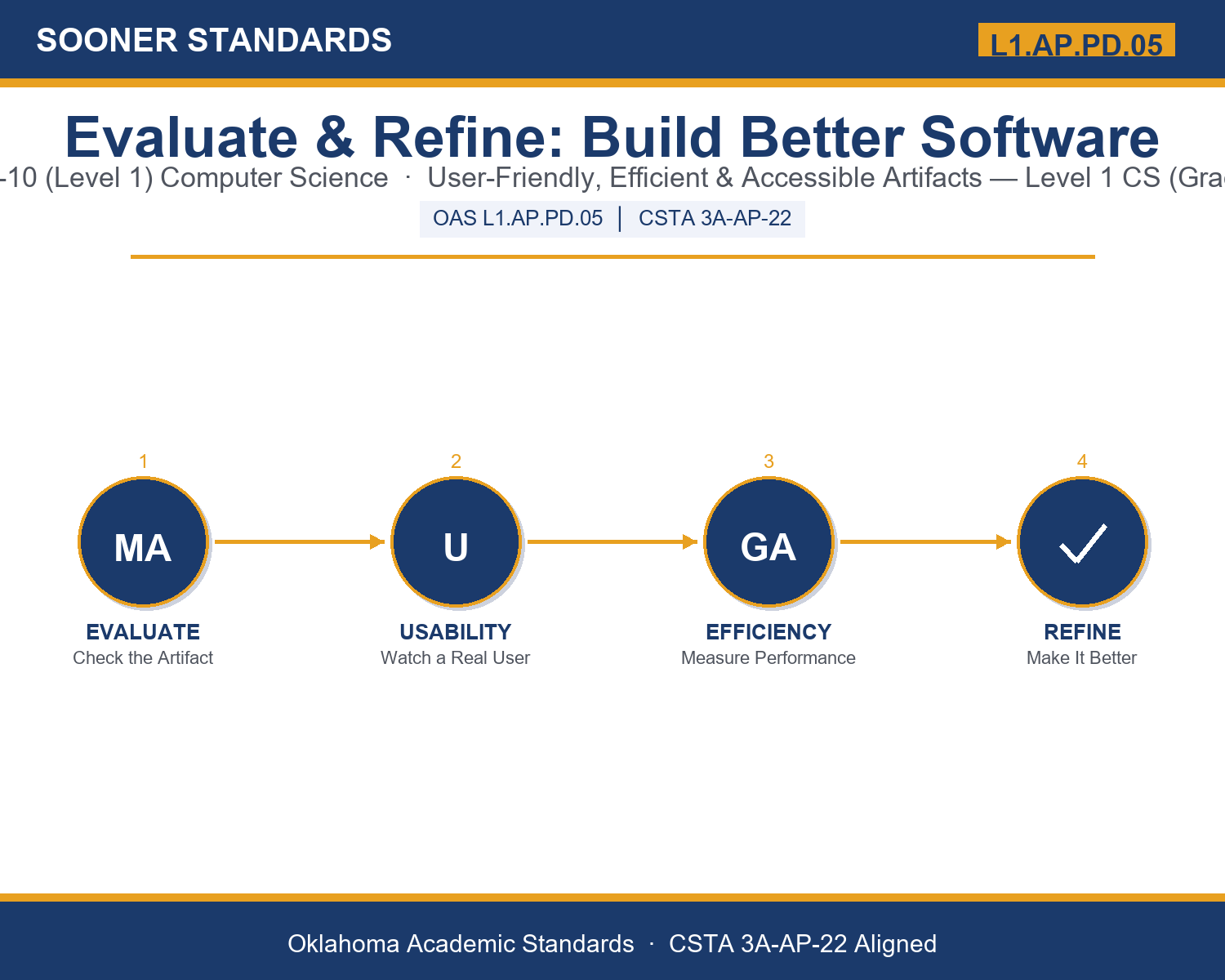
Evaluate and refine computational artifacts to make them more user-friendly, efficient and/or accessible. — Oklahoma Academic Standards for Computer Science (February 2023)
In plain language: This standard asks Level 1 students (grades 9-10) to evaluate a piece of software they or someone else built, judging whether it is easy to use, runs efficiently, and works for people with different abilities or devices, then make a specific, evidence-based improvement.
In student-friendly terms, the learning target is: "I can evaluate a computational artifact along user-friendliness, efficiency, and accessibility using real evidence, and refine the artifact based on what that evaluation reveals."
What Students Should Be Able to Do
- I can distinguish between user-friendliness, efficiency, and accessibility and identify which lens a given problem falls under.
- I can describe specific evidence-gathering methods for each lens (observation, timing, accessibility checks).
- I can propose a refinement that is directly justified by evaluation evidence, not assumption.
- I can explain why re-evaluating a refinement matters and describe how iteration works.
Along the way, students pick up the working vocabulary of the topic: artifact, evaluate, refine, usability, efficiency, accessibility, feedback, iteration, interface, latency, heuristic, refactor, prototype, stakeholder.
Evaluate And Refine Software: Misconceptions to Watch For
These are the wrong turns students reliably take with this standard — knowing them ahead of time is half the lesson plan. Each correction strategy below comes straight from the unit's teacher guide (the paragraph and activity references point into the unit itself).
1. "A bug-free program does not need any further evaluation."
Return to paragraph 1. A program with zero bugs can still be confusing, slow, or inaccessible — evaluation checks more than whether the code runs correctly.
2. "Evaluating usability just means asking the builder if the artifact is easy to use."
Point back to paragraph 2. The builder already knows how everything works, so usability problems hide from them. Reliable evaluation means watching an unfamiliar user attempt a real task.
3. "Refinement means changing whatever seems like a good idea."
Emphasize paragraph 1's definition: refinement is a deliberate, evidence-based change made in direct response to what an evaluation revealed, not a guess.
4. "Once you refine an artifact one time, the evaluation process is finished."
Revisit paragraph 5's discussion of iteration. Evaluation and refinement form a repeatable cycle, and skipping re-evaluation is a common mistake.
Discussion Starters You Can Use Tomorrow
- Think of an app you use daily. Which of the three lenses (user-friendliness, efficiency, or accessibility) do you think its designers worked hardest on, and which do you think they overlooked?
- Why might a team deliberately test an artifact with people very different from themselves, rather than only testing it with people similar to the builders?
- Describe a real-world artifact where fixing one lens (say, efficiency) might accidentally create a problem for a different lens (say, accessibility). How would you check for that trade-off?
Bringing It Home
This topic is a natural one for families. One ten-minute activity to try: Together, pick an app or website your family uses often and try a task on it while your student watches, describing out loud anything that confuses you or takes longer than expected. Ask your student which lens (user-friendliness, efficiency, or accessibility) your struggle fits, and what specific change might fix it. There are no wrong answers — the goal is hearing their reasoning.
Where This Leads
Students who can evaluate a computational artifact along user-friendliness, efficiency, and accessibility using real evidence, and refine the artifact based on what that evaluation reveals are building skills used every day in UX research, software engineering, accessibility specialist, and quality assurance / test engineering.
See the Unit in Action
Get the Complete L1.AP.PD.05 Unit
I built a complete, no-prep unit for this standard — Evaluate and Refine: Making Programs More User-Friendly, Efficient, and Accessible — covering 3-4 days of instruction across 44 pages:
- Teacher guide — day-by-day pacing, misconceptions to watch for, discussion questions, differentiation for support / ELL / extension, and a 4-point rubric
- Student learning target page — a kid-friendly "I can" statement with success criteria
- Full content lesson with 3 embedded "Check Your Understanding" checkpoints
- 12-question assessment (6 multiple choice, 4 true/false, 2 short answer) with a complete answer key, explanations, and exemplar responses
- Group activity — "Evaluate and Refine: The Artifact Audit" (25-30 minutes)
- Individual activity — "My Artifact Evaluation Log" (20 minutes)
- Crossword and word search built from all 14 vocabulary terms (with answer keys)
- Family connection letter — a plain-language page for parents, with dinner-table questions and a 10-minute home activity
- Certificate of achievement — ready to sign and send home
- Artifact Audit Card Set: Evaluate and Refine (separate printable, 2 pages)
- Reference Sheet: The Three Evaluation Lenses (separate printable, 2 pages)
- My Artifact Evaluation Log (separate printable, 2 pages)
Get Evaluate & Refine: Build Better Software on Teachers Pay Teachers →
Also aligned to CSTA 3A-AP-22: Modify an existing program to add additional functionality and discover and fix errors using systematic error-detection strategies.
Every Sooner Standards resource is built directly from the official Oklahoma Academic Standards for Computer Science (February 2023) — standard text verified, never paraphrased from memory.