Teaching Working Like a Dev Team in Grades 11-12 (Level 2): Oklahoma Standard L2.AP.PD.02
Teaching Working Like a Dev Team in Grades 11-12 (Level 2): Oklahoma Standard L2.AP.PD.02
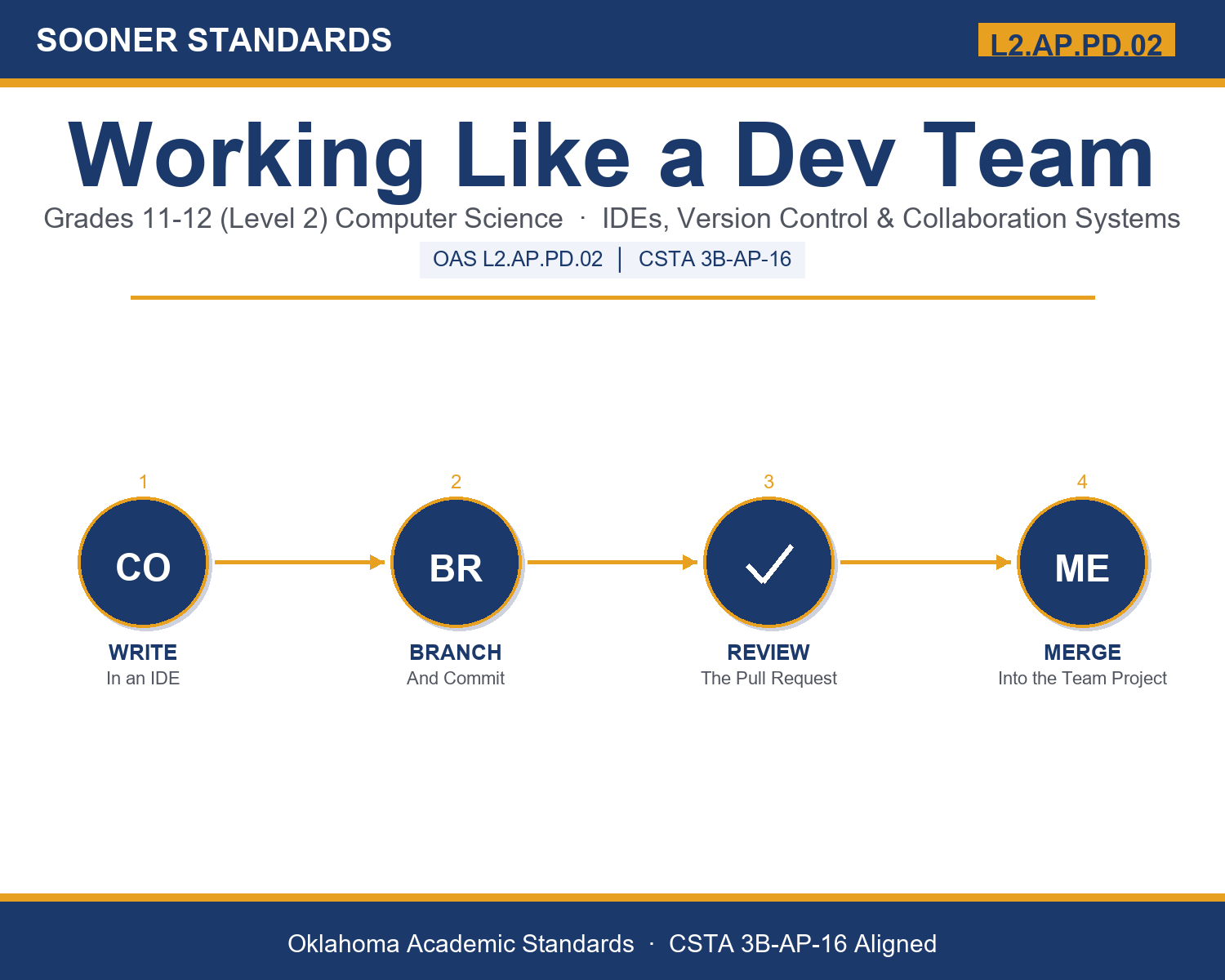
Teaching version control for teams in grades 11-12 (level 2) does not have to be complicated. Picture a software engineer opening a pull request and waiting for teammate code review before merging a new feature into the main branch. That kind of thinking is exactly what Oklahoma's grades 11-12 (level 2) computer science standard L2.AP.PD.02 asks students to practice — and it is very teachable with the right materials. This post walks through what the standard means, the misconceptions students bring to it, and discussion starters you can use tomorrow, whether you teach in a classroom or at your kitchen table.
What Does Standard L2.AP.PD.02 Actually Ask?
Design software in a project team environment using integrated development environments (IDEs), versioning systems, and collaboration systems. — Oklahoma Academic Standards for Computer Science (February 2023)
In plain language: This standard asks students to explain how a team of programmers, who may not even work in the same building, use shared tools to write code together, track every change that gets made, and review each other's work before it becomes part of the finished project.
In student-friendly terms, the learning target is: "I can design software in a project team environment by explaining how an IDE, a versioning system, and a collaboration system work together, and I can trace a realistic workflow from an issue through branches, commits, and a pull request to a final merge."
What Students Should Be Able to Do
- I can explain what an IDE bundles together and why that helps a developer working on a team.
- I can trace a sequence of commits and branches and explain how a versioning system preserves a project's history.
- I can resolve a simple merge conflict and explain why it occurred.
- I can explain how a pull request and code review help a team catch mistakes before they reach the shared project.
Along the way, students pick up the working vocabulary of the topic: ide, repository, commit, branch, merge, conflict, pullrequest, codereview, collaboration, versioning, revert, issue, debugger, workflow.
Version Control For Teams: Misconceptions to Watch For
These are the wrong turns students reliably take with this standard — knowing them ahead of time is half the lesson plan. Each correction strategy below comes straight from the unit's teacher guide (the paragraph and activity references point into the unit itself).
1. "An IDE and a versioning system are the same thing."
Return to the 'Three Tools, Three Jobs' comparison chart. Have students explain, in their own words, what job each tool does — an IDE runs on one developer's machine, while a versioning system tracks history across the whole team.
2. "A branch is a permanent, separate copy of the project that never rejoins the main version."
Draw a simple branch-and-merge diagram together. Show that a branch is meant to be temporary — created to isolate work, then merged back into the main branch once finished.
3. "A merge conflict means something is broken or the project has failed."
Reframe conflicts as a normal, expected part of teamwork, not a failure. Walk through paragraph 4's example together and show that resolving a conflict is a routine decision, not a crisis.
4. "Code review is optional and only slows a team down."
Connect to paragraph 9's tradeoff discussion. Ask students to imagine an unreviewed change reaching a live product used by millions of people, and discuss why teams accept the extra time review takes.
Discussion Starters You Can Use Tomorrow
- Why might a team choose to require every change to go through a pull request, even for a small, one-line fix?
- How is a versioning system's commit history similar to, or different from, the 'version history' feature in a tool like Google Docs?
- Describe a non-software team project where something like 'branching' — working separately before combining results — would actually help, versus one where it would just create confusion.
Bringing It Home
This topic is a natural one for families. One ten-minute activity to try: Together, pick a shared family task that changes over time (a grocery list, a chore chart, a household budget) and have your student describe how a 'version history' for that task would work: what would get saved, who would need to see each change, and how you would undo a mistake. There are no wrong answers — the goal is hearing their reasoning about tracking change over time.
Where This Leads
Students who can design software in a project team environment by explaining how an IDE, a versioning system, and a collaboration system work together, and trace a realistic workflow from an issue through branches, commits, and a pull request to a final merge are building skills used every day in software engineering, DevOps / release engineering, open source development, engineering management, and quality assurance / test engineering.
See the Unit in Action
Get the Complete L2.AP.PD.02 Unit
I built a complete, no-prep unit for this standard — Working Like a Dev Team: IDEs, Version Control, and Collaboration Systems — covering 3-4 days of instruction across 45 pages:
- Teacher guide — day-by-day pacing, misconceptions to watch for, discussion questions, differentiation for support / ELL / extension, and a 4-point rubric
- Student learning target page — a kid-friendly "I can" statement with success criteria
- Full content lesson with 3 embedded "Check Your Understanding" checkpoints
- 12-question assessment (6 multiple choice, 4 true/false, 2 short answer) with a complete answer key, explanations, and exemplar responses
- Group activity — "Team Workflow Simulation: From Issue to Merge" (25-30 minutes)
- Individual activity — "My Dev Workflow Portfolio" (20-25 minutes)
- Crossword and word search built from all 14 vocabulary terms (with answer keys)
- Family connection letter — a plain-language page for parents, with dinner-table questions and a 10-minute home activity
- Certificate of achievement — ready to sign and send home
- Workflow Scenario Cards: From Issue to Merge (separate printable, 2 pages)
- Reference Notes: IDEs, Version Control, and Collaboration (separate printable, 2 pages)
- My Dev Workflow Portfolio (separate printable, 2 pages)
Get Working Like a Dev Team on Teachers Pay Teachers →
Also compared with CSTA 2017 3B-AP-20
Every Sooner Standards resource is built directly from the official Oklahoma Academic Standards for Computer Science (February 2023) — standard text taken directly from the source document.