Python: How Many Files in folder and Sizes
In order to check the files and file sizes, we can use the os.path module.
import os
from os.path import join
for (dirname, dirs, files) in os.walk('.'):
   for filename in files:
       if filename.endswith('.txt') :
           thefile = os.path.join(dirname,filename)
           print (os.path.getsize(thefile), thefile)
Above is the actual code to check the immediate folder (location you put the Python code in.
Let’s break this down
import os
from os.path import join
The first two lines import the OS and Join modules.
for (dirname, dirs, files) in os.walk('.'):This code line does the walkthrough, identifying the directories, folders and files, via the os.walk. The (‘.’) tells us to review the current folder we are in.
for filename in files:This line of code will search all files within the folder.
if filename.endswith('.txt') :This line of code provides a check. It is checking for any file names that end in .txt. If it does end in .txt then perform the next line(s) of code.
 thefile = os.path.join(dirname,filename)
           print (os.path.getsize(thefile), thefile)
These two lines of code perform the function, based on the prior code line.
The first code joins the folder and filename and places it in the variable thefile.
The second line of code does two things.
- Uses the value ‘thefile’ and gets the file size,
- prints both the file size and the filename.
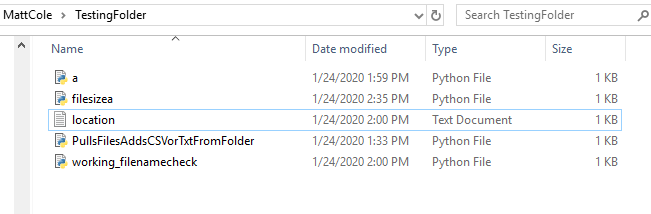
Let’s use the above folder as our example.
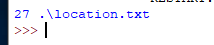
Running the job for .txt our result shows the file size as 27, and name.
   for filename in files:
       if filename.endswith('.py') :
           thefile = os.path.join(dirname,filename)
           print (os.path.getsize(thefile), thefile)
If I changed the filename search to py, and run it, the following outcome is provided.
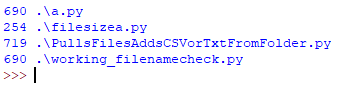
while the Windows version show 1 kb size when viewed, the Python program provides a more detail size.

Matt Cole has high regard for knowledge share. He has a desire to share critical thinking and information. With a Masters in Information Technology and a wide array of certifications, while not working full-time, he wishes to knowledge share through providing insight, information organization, and critical thinking skills.
#KnowledgeShare | Matt Cole | #infobyMattCole